
- 01.Another office is only a recovery site if staff can access the required applications, credentials, equipment, and dependencies.
- 02.Set recovery targets and restoration priorities for essential business tasks before comparing provider proposals.
- 03.Test a real handover between offices, record failures and owners, and retest before the workflow is treated as recoverable.
Map the Handover Between Offices
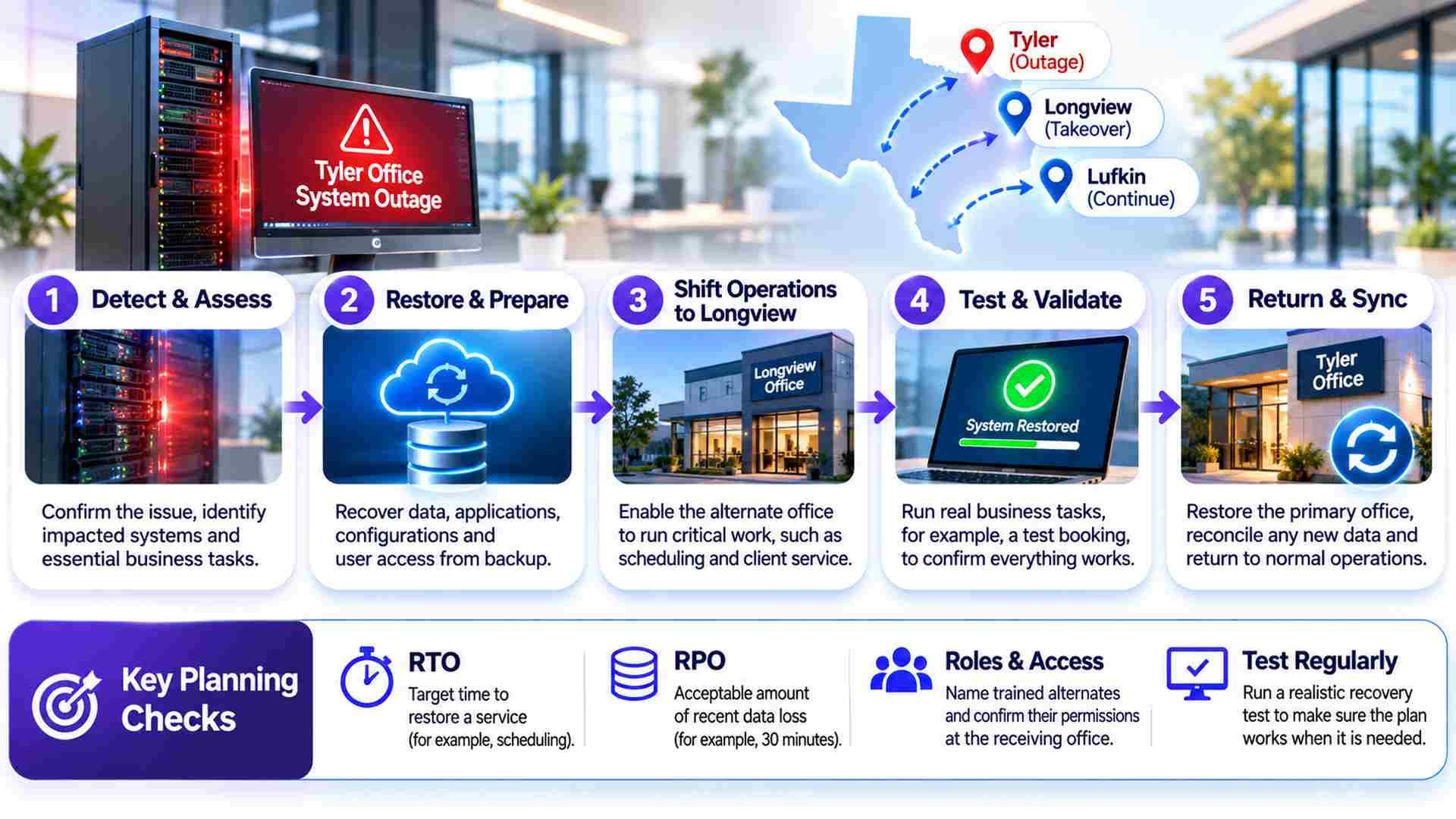
A server in Tyler goes offline. The Longview office still has internet, and someone in Lufkin can see yesterday’s invoice files. Yet nobody can open the current schedule or confidently accept another booking. Three separate offices have become one interrupted business because the application they share has no proven recovery route.
Searching for “backup and disaster recovery Tyler TX” can help an owner find suppliers. Choosing one requires a harder question: can another location actually take over essential work? Check access, staffing, and equipment at the receiving office. The assessment should follow the work between branches, including what happens when the original office returns.
Consider a hypothetical service company with scheduling in Tyler, project records in Longview, and invoicing in Lufkin. Its first planning decision is which tasks another office must absorb if Tyler becomes inaccessible. Taking tomorrow’s bookings may matter immediately; retrieving older project photographs may wait. Assign priorities to work, then identify the technology required to perform it.
Define the Complete Recovery Task
A backup preserves recoverable information; disaster recovery coordinates its return to useful service. Before choosing a recovery provider, specify what must actually work. In this example, the schedule needs its database, application configuration, licensing, and authorized accounts. A proposal limited to document restoration would leave the scheduling team blocked.
DEFCOR’s small business recovery guide covers those foundations. The additional question for several offices is where responsibility changes hands: who provides a usable application, who makes it reachable from Longview, and who confirms that a substitute scheduler can work? Record each handover so neither the application supplier nor the backup provider assumes the other owns it.
Establish Who Can Take Over
A disaster recovery plan for small business needs a named substitute for each essential role. If the only scheduler is unavailable, an accessible database cannot accept bookings by itself. Train an authorized alternate, check their permissions, and document which decisions still require approval. Avoid granting broad access merely to make the exercise easier.
Staffing belongs in the scope of backup and disaster recovery Longview TX providers assess. Check spare devices, application seats, secure access, and workload before designating the receiving office. A working spare computer contributes little if its user cannot access the schedule. Personal equipment should enter the plan only after authorization and security requirements have been addressed.
Specify What Must Be Recovered and When
Proposals for backup and disaster recovery Tyler TX businesses receive should separate service downtime from lost information. Recovery Time Objective (RTO) is the target time to restore a service. Recovery Point Objective (RPO) identifies the point to which data must be recoverable, commonly expressed as a tolerable interval of data loss. NIST SP 800-34 provides contingency-planning guidance that uses RTO and RPO as recovery planning concepts.
Suppose the company sets an illustrative three hour scheduling recovery target and accepts thirty minutes of lost entries. Neither figure is a provider commitment. The design must support them, and the exercise must measure them. Agree when timing starts, what counts as usable service, and which dependencies are included before comparing proposals.
In proposals for backup and disaster recovery Lufkin TX providers prepare, invoicing may deserve a different recovery deadline. Restoring invoices before scheduling could consume equipment or specialist time needed elsewhere. Make those resource conflicts explicit. Owners should approve the restoration order and any temporary reduction in service instead of leaving a technician to decide during an incident.
Distinguish a Missing Office From a Missing Supplier
If Tyler’s server fails, replacement infrastructure may support restoration. If a hosted scheduling supplier is unavailable, having an export does not establish that its application can run elsewhere. Ask the supplier what records can be exported, in which format, and how an authorized user could use them without the original service.
When comparing business data backup Texas providers offer, check coverage for cloud records, local databases, and unique laptop files separately. Each may have different retention and restoration methods. For the scheduling example, the scope should say whether the provider restores an application, supplies records for manual use, or depends on the supplier returning first.
Check Whether the Receiving Office Is Independent
Shared infrastructure can defeat a multi-location recovery design. Longview may depend on Tyler’s identity service or remote access gateway. Trace the substitute employee’s route from device to application. If authentication still requires the unavailable server, moving the database alone has not created an independent recovery route.
Test Connectivity With a Realistic Workload
Evaluate the recovery setup proposed for Longview over the connection staff would actually use. A small file retrieved through the provider’s fast network says little about restoring a large database to your office. Include transfer time, infrastructure preparation, access recovery, and business validation in the exercise.
A regional interruption may affect several offices simultaneously. Build a fallback that does not require employees to travel into unsafe conditions. Confirm which work can proceed remotely and which tasks must wait for equipment or premises.
Longview also needs a fallback if its receiving capacity is exhausted. Decide whether a smaller team can handle urgent bookings while other work pauses, and identify who tells staff that reduced service has begun. When assessing recovery options, request a destination with enough capacity for the agreed workload, not simply enough disk space to hold the files.
Keep Recovery Access Available and Controlled
When buying business data backup Texas suppliers manage, examine who can alter each copy as well as where it resides. A second copy may remain vulnerable if the same compromised account can delete it. Restrict deletion and retention changes, protect administrative accounts with multifactor authentication where supported, and confirm how authorized substitutes retrieve recovery credentials and encryption keys when ordinary access fails.
DEFCOR’s managed IT services place backup alongside access and infrastructure support. In your agreement, assign backup administration, alert review, and corrective work explicitly. A missed job needs an investigator and a recovery deadline. Ask for the last usable recovery point for each essential application, plus evidence that protection resumed after a failure.
Suspected compromise needs a separate response path. Containment, investigation, and a clean destination may be necessary before restoration; a backup does not prove the attacker is gone. CISA recommends offline, encrypted backups and regular testing. Discuss offline or immutable protection with the provider, including retention settings and privileged access, rather than relying on a product label.
Prove the Handover Through One Business Task
Before accepting a recovery service, run a controlled exercise with Tyler unavailable. Have the authorized alternate in Longview access an isolated recovered schedule, find a known test appointment, and record a sample booking. Disable connections that could issue real invoices, notify customers, or change production records.

A disaster recovery plan for small business should retain the results: the recovered data point, elapsed time, completed task, failed dependencies, and corrective owners. Use representative volumes. If the exercise misses its target, determine whether access, transfer, application setup, or staffing caused the delay. Correct the problem and retest rather than quietly redefining success.
The Lufkin recovery test should include invoicing work captured during the interruption. Give temporary records unique references, assign reconciliation, and check for duplicate charges. Identify which system becomes authoritative after restoration. Without that decision, two offices can keep updating different versions while each believes the service has recovered.
During the return to Tyler, prevent simultaneous editing in both environments. Agree when temporary intake stops, reconcile the remaining records, and validate the production schedule before staff resume normal work. Retain temporary copies securely until their owner approves the next retention or deletion step.
Separate Remote Recovery From Local Attendance
DEFCOR’s backup and disaster recovery service describes remote configuration, scheduled restore testing, and written recovery procedures. Compare those capabilities with the scope of backup and disaster recovery Tyler TX providers quote. Identify who supplies replacement hardware, who can work onsite, and how access is arranged. A remote restoration commitment does not establish attendance at a particular address.
Compare Longview support terms separately from Tyler’s. Support hours, travel conditions, equipment availability, retrieval charges, and temporary hosting may differ. Quotes for backup and disaster recovery Lufkin TX businesses request should identify these costs too. Ask when billing begins during an incident and which recovery tasks fall outside the subscription.
Before signing for business data backup Texas providers will administer, settle ownership and exit arrangements. A successor should demonstrate restoration from an authorized export before the outgoing supplier deletes the remaining copies. Record these responsibilities alongside the service scope:
- Name the incident lead and substitute, including authority to approve restoration, spending, and supplier escalation.
- Specify protected systems, retention, recovery targets, exercise scope, and responsibility for correcting failed jobs.
- Define usable exports, access handover, transition assistance, and deletion timing when the service ends.
Conclusion
Judge backup and disaster recovery providers in Tyler, TX by the handover they can demonstrate. Start with scheduling: can an authorized alternate accept a booking without the original office, then return that record safely? Use the answer to improve the disaster recovery plan for small business operations. A failed dependency needs a correction owner and a retest date before the workflow is treated as recoverable.
Frequently Asked Questions
Does having another office guarantee recovery?
No. The receiving office needs working applications, authorized access, suitable equipment, and trained staff.
What is the difference between RTO and RPO?
RTO sets the recovery time target; RPO defines the acceptable data recovery point.
What should a recovery exercise prove?
An authorized employee can complete an essential task using recovered systems within agreed targets. Record failures, assign corrective owners, and retest before accepting recovery. Also test how temporary records return to production systems.
Does remote recovery include onsite support?
Not automatically. Confirm attendance, hardware replacement, travel conditions, and escalation separately for each address.
Defcor Team
. Part of the Defcor engineering team that builds and manages autonomous AI phone agents, IT systems, and automation infrastructure across Texas.