
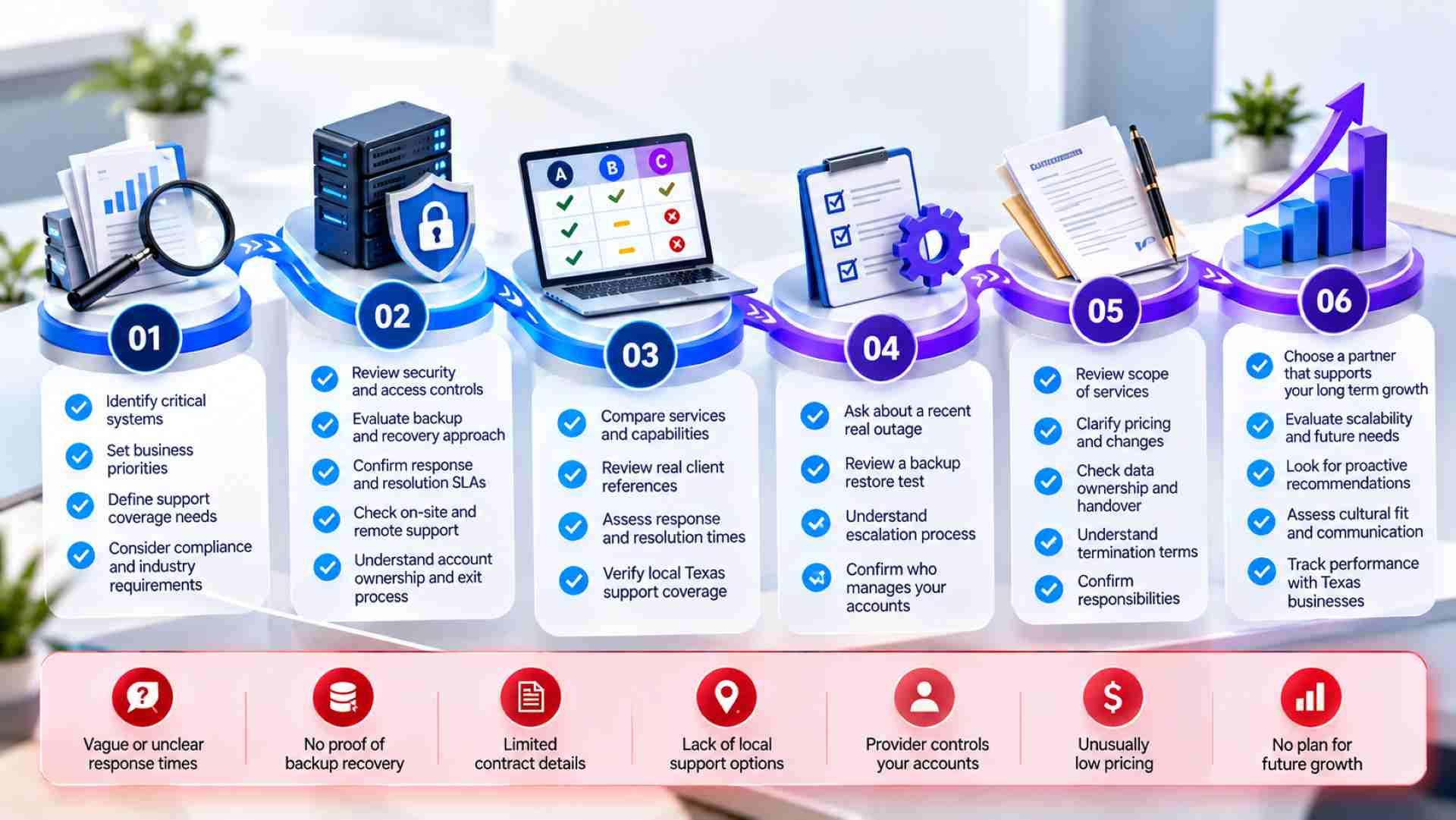
- 01.Compare technical response, restoration, and resolution—not just ticket acknowledgment.
- 02.Ask for evidence such as incident records, restore tests, references, and location-specific coverage.
- 03.Clarify exclusions, total costs, account ownership, cancellation, and handover before signing.
Start With Your Operations
Imagine a Houston office losing access to its files shortly before payroll is due. The IT company acknowledges the ticket, but the owner cannot find out who is investigating or when the next update will arrive. The agreement should establish who takes responsibility and keeps the owner informed.
If you are deciding how to choose a managed IT provider in Texas, begin by examining what the team commits to doing when work stops. Managed IT means assigning ongoing technology responsibilities to an outside provider, usually for a recurring fee. Coverage can include support, maintenance, security, and recovery, but the label does not establish what is included. The strongest proposals explain responsibilities in terms an owner can evaluate. This guide focuses on selecting a provider, while DEFCOR’s managed IT support overview provides broader context on the systems involved.
Start by identifying which interruptions your business can tolerate. Record critical applications, locations, working hours, and the people responsible for each workflow. Give candidates this inventory so they can propose coverage against your actual needs rather than quote an assumed number of computers.
Match the Agreement to Your Business
An occasional repair contractor may suit a business that only needs isolated fixes. An ongoing agreement assigns recurring work, while a shared arrangement can support an existing internal IT employee. When comparing managed IT services for small businesses in Texas, decide which responsibilities you want to delegate and which stay inside your company. For example, an accounting office may need payroll support beyond ordinary office hours. Request a proposal that names covered devices, accounts, applications, and locations, then identifies exclusions. One of the practical questions to ask a managed IT provider is how an ordinary support request becomes a separately billed project. A useful answer includes an example, the approval process, and the charges you would see on an invoice.
Microsoft 365 administration, security monitoring, cabling, emergency labor, and migrations may be priced differently. In 2026, the inventory also needs an operating system review. Standard support for Windows 10 Home and Pro ended on October 14, 2025. Eligible enrolled devices can receive Extended Security Updates, which do not restore general product support; Long-Term Servicing Channel releases have separate lifecycles. A provider should identify affected computers and propose a documented upgrade or eligible update plan. Those transition costs should also be visible in the proposal.
Make Support Commitments Testable
Compare managed IT support response times using the same definitions. Acknowledgment confirms receipt; technical response means someone qualified has begun investigating. Restoration and final resolution are separate milestones. The agreement should define priorities, covered hours, when timing starts, and escalation for missed targets.
Walk Through a Friday Outage
Consider an accounting application failing at 4:45 p.m. Friday while employees work remotely. Ask the candidate to explain triage, contact with the application vendor, authorization for emergency work, and communication if office email is unavailable. An outage walkthrough helps you evaluate a provider against a specific business problem. Request a redacted incident record demonstrating these commitments, rather than accepting a description of the provider’s preferred process.
Escalation matters when the assigned technician reaches a limit. The agreement should identify who takes over, who contacts outside vendors, and who can approve additional charges. Confirm there is a backup for that role; the provider owner’s personal phone is not a complete coverage plan. During the walkthrough, check that the records show how the following commitments work together, including when the first contact is unavailable.
Incident timestamps showing when technical investigation began.; Escalation contacts with authority and backup coverage.; Progress updates stating the next communication time.
Check the record’s first technical action against the time the request arrived. An automated receipt does not establish that a technician began investigating. Where work depends on another vendor, look for evidence that someone pursued the handoff and retained responsibility for updating your business.
The provider may not know the restoration time yet, but its update should identify the remaining obstacle and next action. A message saying only that the team is working on it leaves the owner unable to decide whether employees should wait or use a temporary process. Ask how updates reach your contact during an email outage. Afterward, the incident review should explain missed commitments and corrective action, without treating an isolated fast response as proof of consistent service.
Verify Coverage at Each Address
For businesses with multiple Texas locations, statewide coverage needs an explanation for each address. A Dallas office and a Beaumont branch may have different dispatch arrangements. A failed switch may require a visit, while an account configuration problem may be resolved remotely. Confirm who travels, whether subcontractors are used, applicable charges, and what happens when roads or power outages affect access. A credible proposal distinguishes remote support availability from a technician’s arrival and describes alternatives when a visit cannot happen promptly.

DEFCOR describes a remote support model backed by local technicians in its managed IT support services. Evaluate any provider’s proposed coverage against each site’s equipment and access requirements. For managed IT services for small businesses in Texas, the important question is who owns the handoff and coordinates travel, replacement equipment, and outside vendors.
Check Security and Recovery Evidence
The National Institute of Standards and Technology (NIST) recommends documenting service responsibilities when outsourcing cybersecurity. Assign tasks: account administration, device updates, alert review, and incident notification. Software alone does not identify who reviews alerts or authorizes containment outside business hours.
When comparing providers, request evidence of those procedures and clarify which security services require an additional agreement or specialist. Cloud accounts and AI tools also deserve explicit boundaries. If employees use an assistant with company documents, establish who approves the tool, reviews its permissions, and manages access to sensitive information. Ask whether your provider covers that work or only supports the underlying accounts. A recommendation to buy a license should include configuration, employee guidance, and an identified person responsible for reviewing access as business needs change.
Control Administrative Access
Among the essential questions to ask a managed IT provider is how it protects access to your systems. Expect individual administrative accounts, multifactor authentication, permissions limited to assigned work, and records of privileged activity. Find out who disables access when technicians leave and how your business retains administrative control. If sensitive procedural details cannot be shared openly, request a redacted explanation or confidential review rather than accepting an unexplained refusal.
Inspect a Restoration Test
In backup and disaster recovery, a successful backup job proves less than a demonstrated restore. Request a recent test record identifying the application or data restored, elapsed time, result, and outstanding problems. Agree on acceptable data loss and downtime, then check whether the test supports those expectations. A file recovery test does not establish that an entire accounting system can restart. Recovery planning should also identify restoration priorities and a communication method independent of affected systems.
Compare Evidence and Total Cost
Relevant experience is also worth testing. Request a reference from a similarly sized organization using comparable systems, and ask about a difficult incident and recurring problems. Certifications need relevant scope and current status. A useful monthly report identifies unresolved risks, accountable people, and planned actions. Historical managed IT support response times help you examine consistency, especially for critical incidents, but they do not establish what your own agreement includes.
Compare managed IT services for small businesses in Texas against one inventory, including recurring fees, licensing, onboarding, projects, travel, and recovery testing. The lowest monthly figure may exclude necessary work. Check staffing capacity as well: who covers absences, how critical incidents are prioritized, and whether another customer’s emergency changes your service. Have each candidate identify assumptions that would change its quote, so differences in coverage remain visible during the comparison.
Before signing, settle account ownership, renewal terms, cancellation notice, handover charges, and access removal. The final questions to ask a managed IT provider should include who releases documentation and credentials during departure. Obtain an onboarding plan with milestones and responsibility for service during transition. If you want to discuss your locations and systems with DEFCOR, contact the team with the same inventory you provide to other candidates.
Final Thoughts
If you are still weighing how to choose a managed IT provider in Texas, settle the unresolved risks first. A missing restoration test or unclear account ownership is a reason to pause selection. Review managed IT support response times alongside escalation and communication procedures. You should be able to name the person or team responsible for acting when a critical workflow stops. Ensure that person has authority to coordinate outside vendors.
Send each finalist the same incident scenario and read its response beside the proposed agreement. Does the contract include the people, actions, and coverage described? Resolve discrepancies before signing, and keep the agreed inventory and service commitments with your business records. They give you a basis for reviewing performance after onboarding. If a provider can explain its responsibilities clearly and substantiate them with relevant evidence, you have a stronger reason to choose it than a persuasive sales presentation alone.
Defcor Team
. Part of the Defcor engineering team that builds and manages autonomous AI phone agents, IT systems, and automation infrastructure across Texas.