
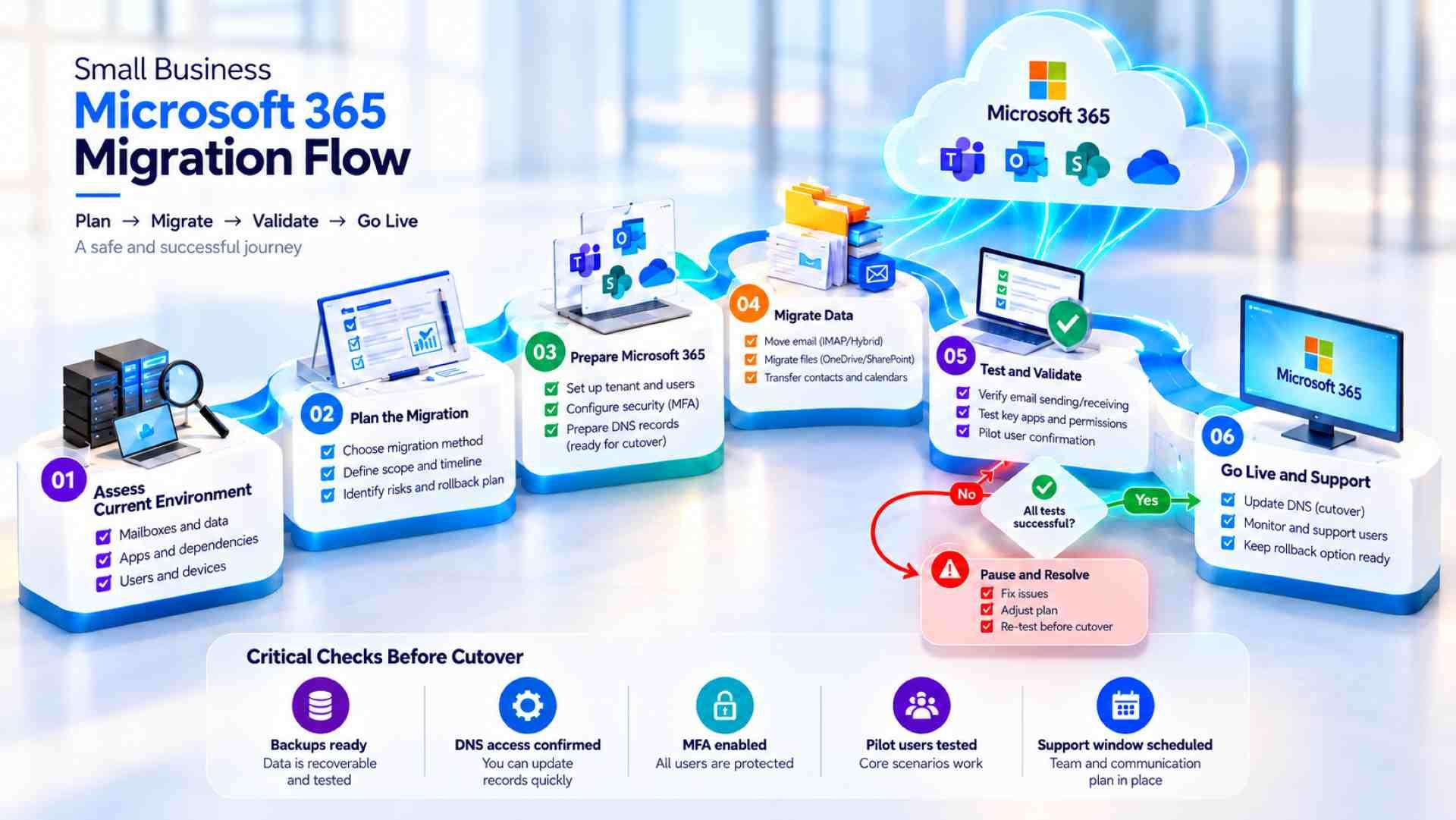
- 01.Inventory mailboxes, calendars, files, permissions, and application senders before choosing a migration method.
- 02.Pilot the migration and verify DNS, mail flow, user access, and critical business workflows before cutover.
- 03.Do not call the migration complete until employees can work normally and unresolved issues have clear owners.
First, Decide What Is Actually Moving
On a busy Monday, a lost customer email can matter more than any new collaboration feature. A rushed switch can interrupt service requests, invoices, and employee calendars. This Microsoft 365 migration checklist helps a small business owner decide what must work before the move, what evidence to demand during it, and when to stop rather than risk customer communication.
Microsoft 365 migration for small businesses is not always a transfer of every tool employees use. Moving from hosted email differs from replacing an Exchange server or leaving Google Workspace. This Microsoft 365 migration checklist separates email, contacts, calendars, shared mailboxes, files, permissions, and devices into distinct workstreams. Assign each one an owner and a test that reflects how employees actually use it. Otherwise, a technically finished migration may leave essential work unfinished.
Map the Source Before Choosing a Method
Start by recording the mail provider, domain registrar, DNS host, administrator access, mailbox sizes, aliases, forwarding rules, distribution lists, and archived mail. Identify who controls each account, including former DNS vendors. Check applications sending messages through the domain, such as appointment tools, website forms, scanners, accounting software, and customer relationship systems. A useful inventory names each sender, its authentication method, and the employee who will test it after cutover.
Know What Each Migration Path Can Carry
Microsoft provides separate migration paths for Exchange, Google Workspace, and generic IMAP sources. A generic IMAP migration transfers email messages, but it does not migrate contacts, calendars, or tasks. Those records require another method, and destination mailboxes must exist before the IMAP move. A service manager who relies on calendar appointments could therefore lose an essential workflow despite seeing old messages in Outlook. Check current Microsoft limits for the chosen method; never select a path simply because its setup appears easier.
Build the Plan Before Anyone Changes DNS
Microsoft 365 migration planning begins with a named migration owner, a business approver, and employees who can test essential work. Choose a relatively quiet period, but do not assume weekends remove risk. A home services dispatcher may still handle urgent customer requests, while legal correspondence may be time-sensitive. The plan should include an independent communication channel so the team can coordinate if company email becomes unavailable.
Confirm Licensing, Identities, and Permissions
Choose Microsoft 365 licenses according to real business needs, not identical subscriptions. Decide who needs desktop applications, how shared mailboxes will be accessed, and who has administrator privileges. For Microsoft 365 migration planning, create the required target accounts, permissions, and recovery methods before copying data. Test multifactor authentication and ordinary employee sign-in. During email migration to Microsoft 365, an administrator being able to log in does not prove a dispatcher can open the correct shared mailbox.
Protect the Source and Define a Fallback
Before changing mail flow, preserve recoverable copies of critical information and record source settings. Synchronization alone is not a tested backup. Identify the person authorized to stop the move if pilot tests fail, and keep the previous service available for an agreed transition period. Reversing DNS cannot automatically reunite mail delivered to different environments. The fallback needs a way to find, compare, and reconcile those messages, plus a separate contact channel if business email is down.
For a broader view of IT ownership after a move, DEFCOR’s managed IT overview explains the operational responsibilities behind business technology. This matters especially when nobody inside the business owns user permissions or support requests after the migration.
Before approving the migration plan, confirm these three commitments:
Inventory every user mailbox, shared address, application sender, calendar, and file location in scope.; Assign owners for licensing, DNS, identity security, data validation, and employee communication.; Agree on cutover criteria, support contacts, fallback steps, and the date for retiring the old service.
Prepare the Destination Without Disrupting the Business
Verify Domain Ownership and Mail Configuration
Verify the domain in the Microsoft 365 tenant without changing live mail routing prematurely. This stage needs an inventory of existing MX and related DNS records, plus a planned cutover sequence. Review SPF, DKIM, and DMARC alongside legitimate third-party senders, including invoicing systems and website forms. Check the MX record’s time to live (TTL) before scheduling the switch; remote mail servers may retain an older destination until cached information expires. Passing means messages reach external recipients and authorized systems keep sending, not merely that Outlook opens.
Run a Pilot With Real Business Situations
For the pilot, choose people whose work differs: an office manager with years of mail, a field employee using a phone, and someone responsible for a shared inbox. Compare sample folders and attachments, and test calendars and permissions if the selected method covers them. Send and receive messages through independent external accounts. Submit a website inquiry and produce a sample invoice. Record each failure, its business impact, and the person assigned to fix it. Do not approve cutover while a critical customer workflow fails.
Move Data and Change Mail Flow in Controlled Steps
In Microsoft 365 migration for small businesses, provision target accounts and check the selected migration method before starting batches. Compare migration reports and sampled mailboxes with the source. A completed batch does not establish that a shared address, delegated access, or application notification works. Review method-specific restrictions and exceptions in current Microsoft guidance. Plan the final synchronization and reconciliation steps appropriate to that method before scheduling the routing change.
Make the Cutover a Decision, Not a Calendar Event
For email migration to Microsoft 365, change inbound routing only when destination accounts, pilot evidence, employee communication, and support coverage are ready. Update the planned DNS records, consider caching, and inspect delivery in both environments during transition. Test external inbound and outbound mail, aliases, and shared addresses. Treat a failed customer inquiry or inaccessible shared inbox as a reason to pause further changes and investigate. The migration owner decides whether to proceed, extend coexistence, or activate the documented fallback; one successful test message is not enough to cancel the former provider.
Check the Work Employees Actually Do
A migration tool may report success while staff cannot retrieve a customer thread, schedule a visit, or open a shared file. Acceptance testing should be performed by employees using their own permissions. Ask them to find historical correspondence, open attachments, send estimates, and work from delegated mailboxes. Test desktop and mobile Outlook, including devices with old profiles. Record failures by severity, responsible owner, and deadline. Business-critical failures should block signoff even when transfer reports are green.
Secure the New Environment Before Calling It Finished
Microsoft 365 migration planning includes security before signoff, not as an indefinite cleanup task. Confirm multifactor authentication, recovery ownership, appropriately limited administrator roles, shared mailbox permissions, and device access policies. Review external sharing and access to collaboration files. Have a responsible professional approve retention and access settings where sensitive or regulated information is involved. Buying a Microsoft subscription does not, by itself, establish organizational compliance or correct permission design.
DEFCOR’s Microsoft 365 support services cover migration, configuration, security, and ongoing administration for small businesses. Compare that scope with your team’s capacity for account changes and device support. Before choosing a provider, clarify who will handle sign-in failures, shared mailbox access, and urgent employee questions during the first working days.

Include Files, Collaboration, and Training Where Relevant
During email migration to Microsoft 365, confirm whether files and collaboration tools are included. OneDrive, SharePoint, and Teams require a distinct plan for ownership, permissions, links, and synchronization. Moving email alone will not recreate file shares or team processes. Ask employees to locate a shared document and verify that an external collaborator has only the intended access. Provide concise training on sign-in, suspicious prompts, shared mailboxes, and reporting missing material for their actual tasks.
The First Week Is Part of the Migration
When evaluating a migration partner, compare the proposed scope with the business processes that must keep working after cutover. A migration partner should distinguish moving data from supporting employees after cutover, including how unresolved issues are documented and escalated. Ask who owns user support, account administration, and urgent employee questions during the first working days.
An often-overlooked step in Microsoft 365 migration for small businesses is assigning the first week after cutover its own owner and review schedule. Watch nondelivery notices, legitimate messages classified as spam, access failures, mobile sign-in issues, and missing calendar information. Retest shared mailbox delegation, automated senders, and customer-facing forms under ordinary traffic. A service company should confirm that a new appointment request reaches the right employee, not merely that it arrived somewhere in the tenant. Keep a visible record of complaints and resolutions.
Define Acceptance With Evidence
Set the final acceptance criteria before moving data. Evidence should cover inbound and outbound mail, access for actual users, essential history, shared resources, and working customer processes. Separate minor defects with assigned deadlines from critical failures that prevent signoff. Record unresolved exceptions, their consequences, and who will fix them. Keep the old environment through the agreed reconciliation period; retire access and subscriptions only after data validation and retention requirements are addressed. Give the business current administrator and support contacts, not just a completion notice.
Conclusion: Treat Migration as an Approval Gate
Use the Microsoft 365 migration checklist as an approval gate rather than a list of buttons. Ask for the source inventory, pilot evidence, written routing and fallback plans, and proof that customer requests still reach the right people. If a critical test fails, require a responsible person to explain the risk and restore a workable path before approval. A migration is complete when the business can operate confidently, not when a dashboard displays 100 percent.
Frequently Asked Questions
What Should a Small Business Check Before Migrating?
Inventory mailboxes, calendars, shared addresses, application senders, permissions, file locations, and DNS ownership. Assign decision-makers, confirm administrator and recovery access, and define the business tests that must pass before mail routing changes.
Will an IMAP Migration Move Calendars and Contacts?
No. A generic IMAP migration transfers supported email folders, not calendars, contacts, or tasks. Those records require a separate migration method or another planned process.
How Can We Reduce Disruption During Cutover?
Run a pilot with real users and business workflows, test external mail delivery and application senders, retain the old service for an agreed transition period, and document who can pause the change or activate the fallback plan.
When Is the Microsoft 365 Migration Complete?
The migration is complete only after employees can perform critical tasks, essential data and permissions are verified, unresolved issues have named owners, and the business approves acceptance based on evidence rather than a transfer dashboard alone.
Defcor Team
. Part of the Defcor engineering team that builds and manages autonomous AI phone agents, IT systems, and automation infrastructure across Texas.