- 01.Choose WordPress when frequent publishing matters and the proposed setup can support your business workflows without repeated workarounds.
- 02.Custom development is worth considering when a specific requirement cannot be met cleanly by the proposed WordPress implementation.
- 03.Compare total cost, maintenance, ownership, support, and handover not just the initial build price.
Understand What You Are Buying
For a service business that regularly publishes content, WordPress usually deserves the first assessment. Custom development becomes worth investigating when a specific requirement cannot be met acceptably by the proposed WordPress implementation. In the WordPress vs custom website decision, frequent editing, customer workflows, and support responsibilities are more useful starting points than a preference for either technology.
Consider a hypothetical Houston HVAC company. Its office manager wants to publish seasonal offers without waiting for a developer, while the owner wants appointment requests to reach scheduling reliably. Both needs should appear in the brief. An attractive design answers neither question, and a custom build is not automatically the more capable or easier website to run.
WordPress is a content management system, or CMS, with tools for publishing pages and managing content. This comparison concerns the open source software installed through a hosting provider, rather than a particular WordPress.com subscription. A custom website is a separately engineered implementation. It might be a simple static site, a website connected to another CMS, or an application with accounts and transactions.
Custom-Coded Website vs. WordPress
WordPress supports custom themes and functionality, so choosing it does not mean accepting a stock design. Separately built websites also commonly use existing frameworks and libraries. A proposal should identify what the developer will actually build: the appearance, the editing tools, the business processes, or some combination. Otherwise, two apparently comparable offers may describe fundamentally different products.
A different business might reach a different decision. Imagine an industrial supplier whose customers configure equipment under compatibility and pricing rules. That logic needs assessment before choosing a platform, including whether supported WordPress components can handle it cleanly. Custom engineering may be justified where the proposed alternatives cannot meet those requirements. A distinctive visual identity alone does not establish that need.
Keep Publishing and Customer Accounts Separate
For the HVAC office, updating service descriptions and posting seasonal advice are publishing tasks. A future customer portal containing equipment records and quote approvals introduces different requirements, including account permissions and data handling. WordPress can support substantial functionality, but the team should assess those requirements directly. A public marketing website and a private application can also use separate systems.
This distinction can simplify selection. If the immediate need is better service pages and a dependable request form, price that project first. An uncertain portal planned for later should not automatically dictate today’s entire architecture. Record its likely requirements, then ask how the initial site would connect to it without forcing an unnecessary rebuild.
WordPress vs. Custom Website Cost
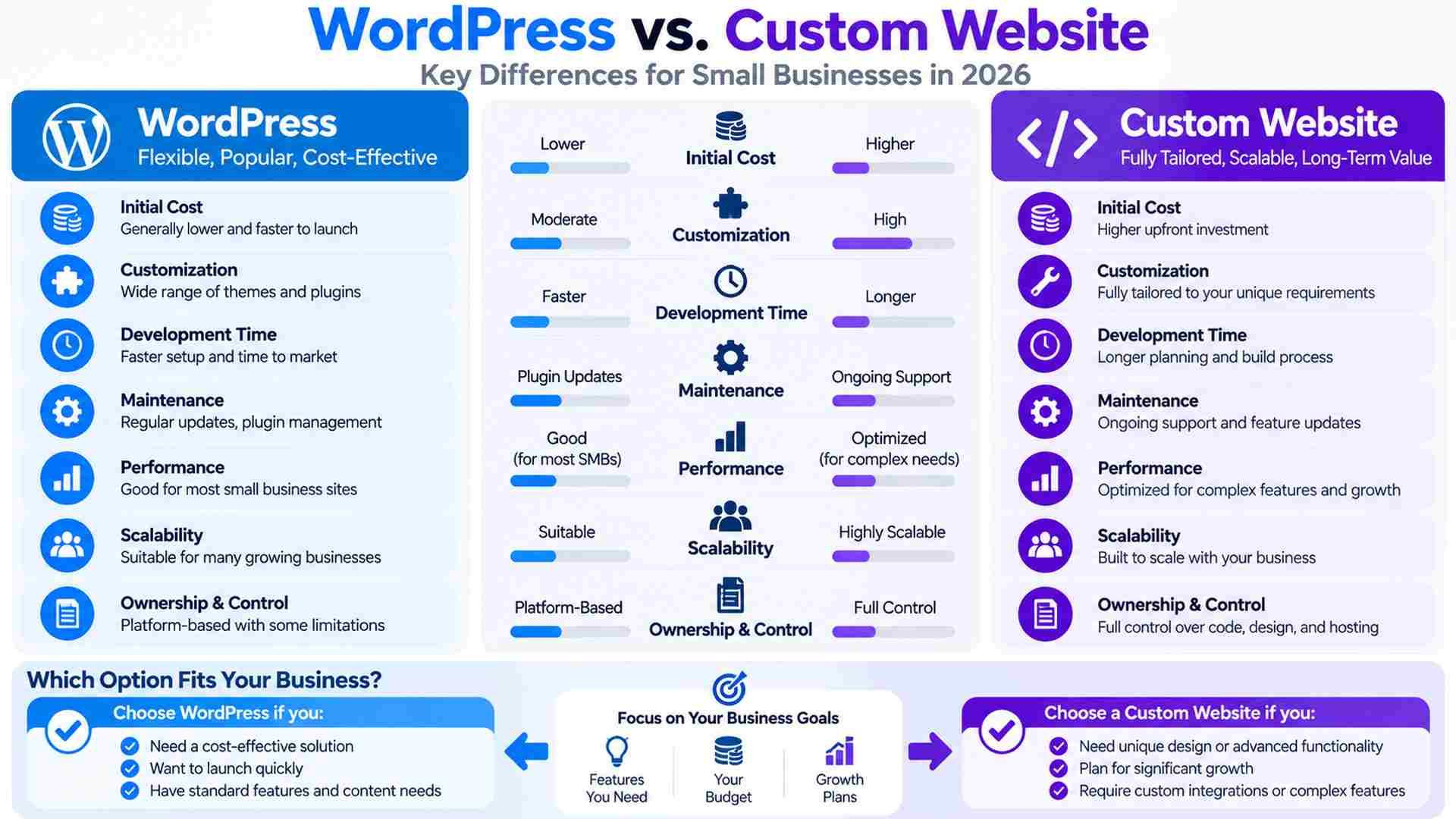
A useful comparison starts with matching scopes. For the HVAC company, assume ten pages, an appointment request form, existing copy to migrate, mobile layouts, and staff training. Both options must provide the same editing capability and launch checks. Comparing that WordPress package with a custom portal would tell the owner little about relative value.
Follow the Budget Beyond the Launch Fee
Use a three-year comparison with actual proposal figures: initial build and migration, plus 36 months of hosting and support, plus renewals, expected changes, and staff time. Include any exit assistance separately. If a provider bundles hosting with maintenance, count it once. Unpriced exclusions should remain visible rather than being treated as free work.
To compare long-term cost, give both providers the same likely changes: publish an offer, add a service page, and modify the request form. Record which tasks staff can complete, which consume support hours, and which require separately billed development. This reveals whether a lower launch price is offset by the work needed to operate the finished website.
The biggest cost difference may emerge when requirements change. Routine publishing can favor an established CMS; repeated adaptations around unusual business rules can favor a focused custom implementation. Neither assumption replaces a scoped estimate. DEFCOR’s WordPress website design and custom website design services cover both approaches, so the discussion can begin with the work your business actually needs.
Delivery timing can change the platform decision as well. The owner should identify who supplies copy, approves layouts, and tests the form. An earlier launch has little value if the office cannot handle the requests it generates or staff training remains unfinished.
WordPress vs. Custom Website Maintenance
Maintenance follows the components in each actual build. WordPress requires care for its core software, themes, plugins, and hosting environment. A custom application may depend on frameworks, software packages, and connected services. A small static site may require less application upkeep, although its forms and external services still need someone responsible for them.
Test What Customers and Staff Actually Use
In the HVAC scenario, an update is successful only when important functions still work. After significant changes, test the request form and its delivery to the office. Use a separate test environment where appropriate, keep backups of the necessary files and data, and verify restoration. A completed update notification does not establish that a customer can successfully request service.
Responsibility is the useful starting point for any maintenance agreement. Hosting support may cover server problems while excluding application code. Name who checks updates, fixes failed forms, and restores service. The agreement also needs an escalation route when the usual developer is unavailable. A website management and support subscription without clear application coverage can leave important work unassigned.
Security work also differs by component. An extension developer may release a plugin patch, but someone must assess and apply it. A flaw in bespoke code needs a developer responsible for the correction. A maintenance comparison should cover both kinds of work where present. Neither platform choice establishes that the implementation is secure or adequately supported.
Check Search Performance and the Request Workflow
Using WordPress or custom code does not by itself guarantee higher rankings. Google’s ranking systems evaluate many page- and site-level signals, while crawlability, useful content, mobile usability, and page experience still require attention. Choosing a CMS does not substitute for that work or guarantee search visibility.
For performance testing, use a representative service page with the images, analytics, and form tools planned for launch. An empty demonstration can conceal the weight of the finished implementation. Agree on performance targets and test keyboard navigation and understandable form errors. Staff should also try a routine content edit before approving the editing interface.
DEFCOR’s guide to small business workflow automation explains the handoffs behind scheduling. An API, the interface through which systems exchange data, may require particular permissions or subscription access. A plugin can help, but does not prove compatibility. For a custom-coded website vs. WordPress comparison, follow a request through that connection, noting what information arrives and who acts on it.
Suppose a customer submits a request while the scheduling platform is unavailable. The implementation needs a recoverable record, an alert, and a defined way for staff to resolve the failure. Test duplicate submissions too. For the HVAC business, a request must remain a request until availability and business rules support confirmation; submitting a form does not establish that a technician has been dispatched.
The project brief should specify which form fields are necessary and who can view submissions. Keep public inquiries separate from detailed private account information. Collecting less data can simplify the workflow, but appropriate access and retention arrangements still need deliberate decisions.
Custom-Coded Website vs. WordPress Handover
Provider dependency also matters when choosing an implementation. A WordPress build may rely on a particular page builder, subscriptions held by an agency, or undocumented custom code. A custom site can be transferable when it uses familiar technologies and has adequate documentation. Transferability depends on the actual implementation and agreement, rather than either label.
The handover should cover domain and hosting control, administrator access, subscription ownership, and any source code needed to maintain the site. A code repository stores that source and its change history; deployment instructions explain how to run it on hosting. A replacement provider should be able to understand both. DEFCOR’s portfolio can inform questions about comparable implementations, without establishing your future costs or results.
For an existing website, the scope also needs a migration plan covering important content, old URLs, and redirects where addresses change. Forms and measurement need checks after launch. With those responsibilities assigned, the selection can follow the business requirement:
- Choose WordPress when frequent publishing matters and the proposed implementation meets your workflows without repeated workarounds.
- Choose custom development when a demonstrated requirement justifies the engineering and its ongoing support fits your budget.
- Consider separate systems when public content and private customer transactions need substantially different access and operational controls.
Final Thoughts
Before settling the WordPress vs custom website question, have the person who will manage the site complete a routine edit. Then follow a customer request through to its destination and review the handover with whoever will support the build. For the HVAC company, a successful offer update and a traceable scheduling request provide stronger evidence of fit than a platform recommendation alone.
Frequently Asked Questions
Is WordPress better for a business that publishes content regularly?
WordPress often fits frequent content updates, provided the implementation gives staff usable editing tools.
Can a WordPress website have a custom design?
Yes. Custom themes and functionality can provide a distinctive design while retaining WordPress publishing tools.
Is WordPress cheaper than a custom website over time?
Compare matching proposals across build costs, hosting, renewals, support, staff time, and expected changes. The lower launch quote does not necessarily represent the lower total cost of ownership.
Does custom development eliminate maintenance?
No. Both approaches need appropriate updates, monitoring, recovery arrangements, and a provider responsible for fixing problems.
Defcor Team
. Part of the Defcor engineering team that builds and manages autonomous AI phone agents, IT systems, and automation infrastructure across Texas.