
- 01.AI automation cost includes more than software licenses; implementation, integrations, usage, monitoring, support, and human oversight also affect the total.
- 02.Pricing varies by workflow complexity, transaction volume, integrations, model usage, security requirements, and the amount of custom implementation required.
- 03.AI automation ROI should be measured against real operational outcomes such as returned staff capacity, faster response, fewer errors, and recovered contribution margin.
AI Automation Cost: What Small Businesses Actually Pay
When business owners ask what automation will cost, the software price is usually the easiest number to find and misunderstand. The real AI automation cost includes setup, integrations, testing, usage, monitoring, and time spent handling exceptions. A useful estimate shows both the initial work and the ongoing expenses instead of treating the subscription as the whole project.
A better question is, “What will it cost to automate this process safely, and what measurable value should it return?” The answer becomes clearer when published monthly charges are separated from the work that must be scoped for the business.
No single average covers both a simple staff workflow and a connected customer service system. The figures below are approximate budgeting examples, not fixed market prices. Actual charges vary by vendor, usage, configuration, taxes, and contract terms.
For example, Microsoft Power Automate Premium is currently listed at $15 per user per month when paid annually, so five licensed users would total about $75 per month before implementation and support. That estimate covers the software seats, not the work required to design the process, connect systems, test it, train employees, and support it after launch.
Microsoft currently lists Power Automate Process at $150 per bot per month for unattended automation. Microsoft currently lists Power Automate Hosted Process at $215 per bot per month, which includes a Microsoft-hosted virtual machine. Setup, data preparation, security review, and maintenance still have to be scoped.
Voice automation can vary more widely. For roughly 1,000 monthly voice minutes, software and telephony costs can vary significantly by provider, included features, model choice, and carrier setup. Published platform rates may look inexpensive at first, but integrations, transfers, storage, recordings, support, and usage add-ons can materially change the monthly total.
Model usage may be one of the smaller line items. For example, a workflow processing around 500 leads with short prompts and outputs may incur only a few dollars in model usage, depending on the model and token volume. The automation platform, CRM actions, API work, retries, and monitoring remain separate.
Those numbers are useful anchors, but none is a complete project price or a DEFCOR quotation. The business still pays for the work needed to build and maintain the workflow. The three scenarios below show where each figure comes from and why apparently simple comparisons can lead to double counting.
How AI Automation Pricing for Small Businesses Is Built
A quote is easier to judge when each cost layer is visible. That is the starting point for understanding AI automation pricing for small businesses. A subscription is not a finished business system.
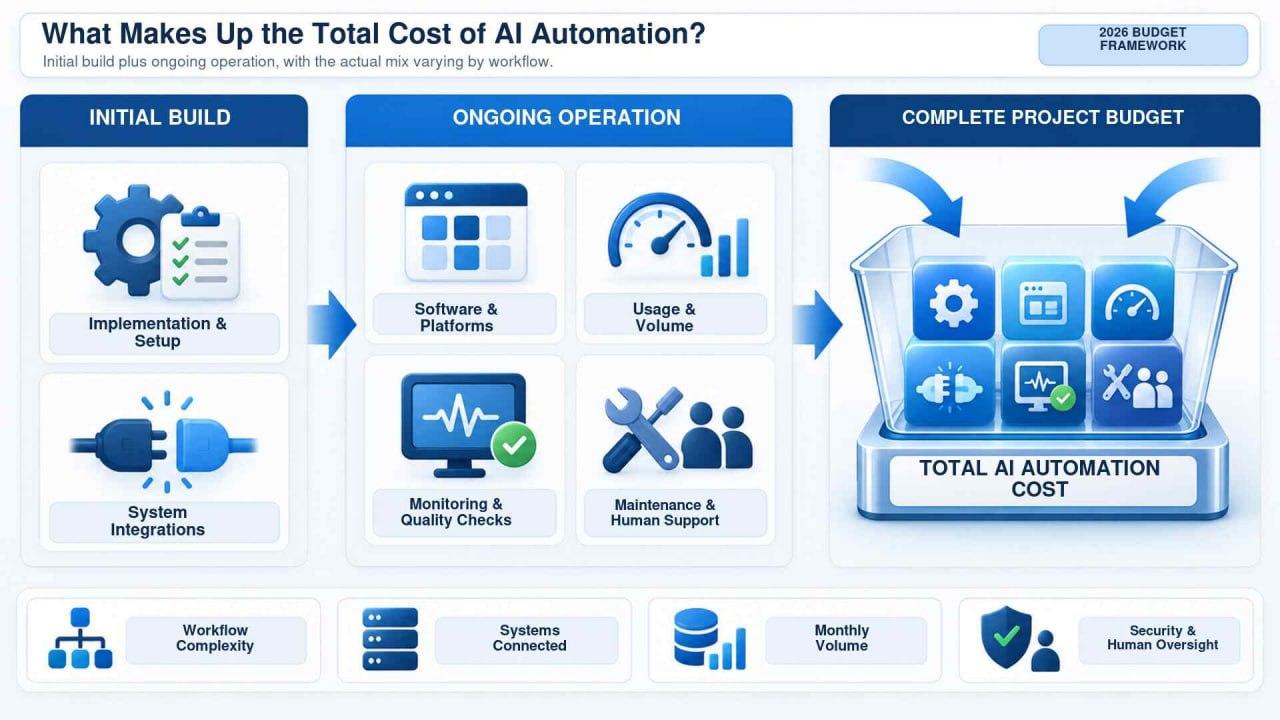
Software and Usage Fees
Most platforms meter users, tasks, bots, messages, tokens, or minutes. Published license prices cover only one part of the cost of a working automation system.
Model providers commonly publish separate input and output token rates. Voice systems may also charge for speech processing and call duration. The bill changes with volume, model choice, and workflow design.
Implementation and Operating Support
Much of the work happens before launch. Someone must document the process, define permitted actions, connect applications, map fields, prepare approved information, and decide when a person should take over. These tasks often account for a large share of AI implementation costs.
After launch, API permissions expire, form fields change, and unusual cases appear. A realistic budget leaves room for monitoring, updates, and periodic review.
Employees may still approve sensitive actions, review uncertain outputs, or handle escalations. Their time belongs in the budget. Excluding it makes the proposal look cheaper, not the operation.
Three AI Automation Cost Scenarios for Small Businesses
These examples use approximate market ranges and stated assumptions. They show how to build a budget, not what every project will cost.
An Operations Workflow Using a Commercial Automation Platform
Using Microsoft Power Automate as an example, five Premium user licenses would total about $75 per month at current annual pricing. Power Automate Process is listed at $150 per bot per month, while Hosted Process is listed at $215 per bot per month and includes a Microsoft-hosted virtual machine.
Vendor pricing and packaging can vary. Workflow design, custom connectors, data cleanup, security review, documentation, and support remain separate.
An AI Phone Agent With 1,000 Monthly Minutes
For about 1,000 monthly minutes, AI phone agent costs can vary significantly by provider, voice model, included features, call volume, and carrier arrangement.
Telephony may add a modest monthly amount when it is billed separately. Do not add a separate carrier estimate when the selected voice plan already includes that service.
Messages, recordings, storage, CRM actions, transfers, analytics, and support can change the total. The provider also needs to test edge cases, settle disclosure rules, and build a reliable human transfer path. The guide to AI phone agents explains why the workflow matters as much as the voice.
A Connected Lead Response Workflow
Now imagine a form that checks a lead, summarizes it, updates the CRM, alerts an employee, and prepares a response. Here, total cost depends on volume, workflow actions, and whether the CRM has a standard connector or needs custom API work.
Assume about 500 monthly leads, with a short input and output for each summary. At commonly available small-model rates, raw model usage could remain within a few dollars per month. That excludes the automation platform, CRM actions, retries, support, and implementation. A Texas HVAC company should also plan for summer peaks rather than a quiet season average.
What Increases AI Implementation Costs?
The business process usually matters more than how new or impressive the AI sounds. AI implementation costs rise when an automation touches several systems, handles sensitive data, or influences decisions with financial or customer consequences.

Integration and Data Readiness
Standard connectors save time, but they do not eliminate configuration. Custom applications, older databases, inconsistent customer records, and systems without usable APIs require more effort. Sometimes data has to be cleaned before an agent can retrieve accurate information or create records anyone can trust.
Exceptions, Security, and Compliance
Real customers submit forms twice, request unavailable appointments, provide incomplete details, or call during an outage. A production workflow needs a sensible response. Permissions should limit what the automation can read or change. Sensitive information requires extra review of collection, retention, access, and vendor terms.
Testing should cover ordinary requests, unusual inputs, incorrect information, and safe failure behavior. Employees need to know what the system handles, what will reach them, and how to report a problem. Skipping these steps may reduce the first invoice, but it often moves the cost into rework and operational risk later.
How to Evaluate AI Automation ROI
AI automation ROI should begin with a process the business can actually measure. Record monthly volume, employee minutes per transaction, error or rework rates, missed opportunities, and the current cost before changing anything.
A practical monthly calculation is:
Net monthly value = labor capacity returned + contribution from recovered opportunities + avoided rework costs − recurring automation expense
Then calculate payback time:
Payback period = initial implementation expense ÷ net monthly value
Suppose a workflow returns about 30 hours monthly, valued at roughly $35 per hour. The potential value is about $1,050. After approximately $250 in recurring costs, net monthly value would be around $800. An implementation costing about $4,000 would pay back in roughly five months if those assumptions hold. Returned time is not cash savings unless the business uses that capacity or avoids a real expense.
Good AI automation ROI reporting follows outcomes such as response time, completed bookings, errors prevented, manual touches removed, and correct escalations. Use contribution margin rather than total recovered revenue, and do not count the same labor benefit twice. More automated activity does not automatically mean the business is getting better results.
How to Compare Automation Proposals
A low quote can leave out the work that makes a system dependable. An expensive proposal can be just as misleading if it bundles features the business will never use. Before comparing totals, ask each provider to answer the same practical questions.
DEFCOR’s AI automation services connect automation to the phone, website, CRM, calendar, and other systems a business already uses. Regardless of provider, get a written boundary between the initial build, recurring vendor charges, maintenance, and optional improvements.
A good first project is usually a frequent process with clear rules, measurable effort, and one accountable owner. It should matter enough to produce a useful result but remain contained enough to test safely. Starting there makes AI automation pricing for small businesses easier to control and gives the team evidence for the next decision.
Conclusion: Build the Budget Around the Actual Workflow
That is why a sensible automation budget starts with the workflow, not the product page. The subscription is usually the easiest line item to see, but implementation, usage, maintenance, internal oversight, and exception handling determine what the system actually costs. The budget also needs a baseline for judging the result.
Before approving a project, write down the process as it works today. Record its current cost, expected volume, and a plain-language definition of success. Then compare every proposal against those same assumptions. This makes the total AI automation cost easier to see and prevents an attractive license price from turning into an unfinished pilot.
Businesses that measure results with their own operational data can expand what works and stop what does not. If you want to map a specific workflow and identify the costs that belong in its budget, DEFCOR can help assess the process, integrations, and oversight the project would require.
- Which workflow, users, applications, and transaction volumes are included, and which fees are fixed, usage-based, or controlled by outside vendors?
- Who owns the accounts, documentation, prompts, data mappings, and credentials, and how are failures detected, retried, reported, and transferred to a person?
- What security controls, data retention rules, and access limits apply, and what changes, support hours, and performance reporting are included after launch?

Michael Hendrix
Founder & CEO, Defcor. Part of the Defcor engineering team that builds and manages autonomous AI phone agents, IT systems, and automation infrastructure across Texas.